Nextend Social Login is a professional, easy to use and free WordPress plugin. It lets your visitors register and login to your site using their social profiles (Facebook, Google, X (formerly Twitter), etc.) instead of forcing them to spend valuable time to fill out the default registration form. Besides that, they don’t need to wait for validation emails or keep track of their username and password anymore.
Demo | Tutorial videos | Docs | Support | Pro Addon
Nextend Social Login seamlessly integrates with your existing WordPress login and registration form. Existing users can add or remove their social accounts at their WordPress profile page. A single user can attach as many social account as they want allowing them to log in with Facebook, Google or X (formerly Twitter).
Three popular providers: Facebook, Google and X (formerly Twitter)
Providers are the services which the visitors can use to register and log in to your site. Nextend Social Login allows your visitors to log in with their account from the most popular social networks: Facebook, Google and X (formerly Twitter).
Free version features
- One click registration and login via Facebook, Google and X (formerly Twitter)
- Your current users can easily connect their Facebook, Google or X (formerly Twitter) profiles with their account
- Social accounts are tied to a WordPress user account so every account can be accessed with and without social account
- You can define custom redirect URL after the registration (upon first login) using any of the social accounts.
- You can define custom redirect URL after each login with any of the enabled social accounts.
- Display Facebook, Google, X (formerly Twitter) profile picture as avatar
- Login widget and shortcodes
- Customizable designs to match your site
- Editable and translatable texts on the login buttons
- Very simple to setup and use
- Clean, user friendly UI
- Fast and helpful support
Additional features in the Pro addon
- WooCommerce compatibility
- BuddyPress compatibility
- UserPro compatibility
- Ultimate Member compatibility
- Easy Digital Downloads compatibility
- Pro providers: LinkedIn, Amazon, VKontakte, WordPress.com, Yahoo, PayPal, Disqus, Apple, GitHub, Microsoft, Line, Discord, Slack, TikTok, Steam, Twitch, Kakao, Reddit, Spotify and more coming soon
- Configure whether email address should be asked on registration at each provider
- Configure whether username should be asked on registration at each provider
- Choose from icons or wide buttons
- Several login layouts
- Restrict specific user roles from using the social logins. (You can restrict different roles for each provider.)
- Assign specific user roles to the newly registered users who use any social login provider. (You can set different roles for each provider.)
- Show the name of the linked providers in the Users table
Usage
After you activated the plugin configure and enable the provider you want to use, then the plugin will automatically
- add the login buttons to the WordPress login page. See screenshot #1
- add the account linking buttons to the WordPress profile page. See screenshot #2
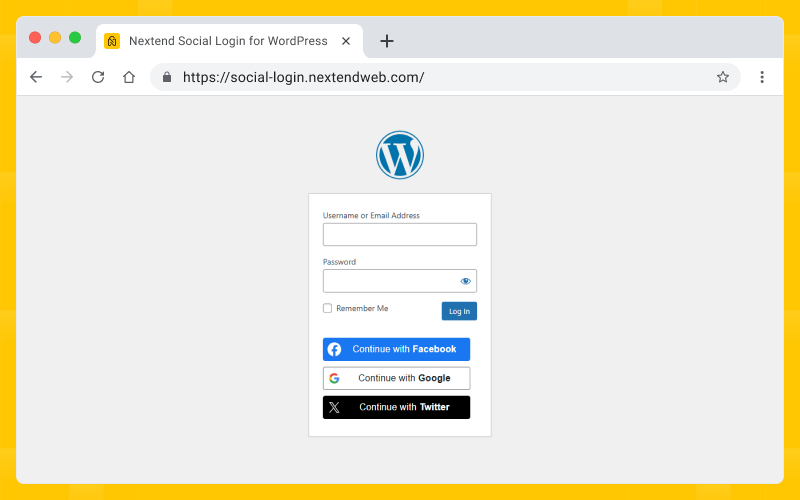
Nextend Social Login and Register on the main WP login page 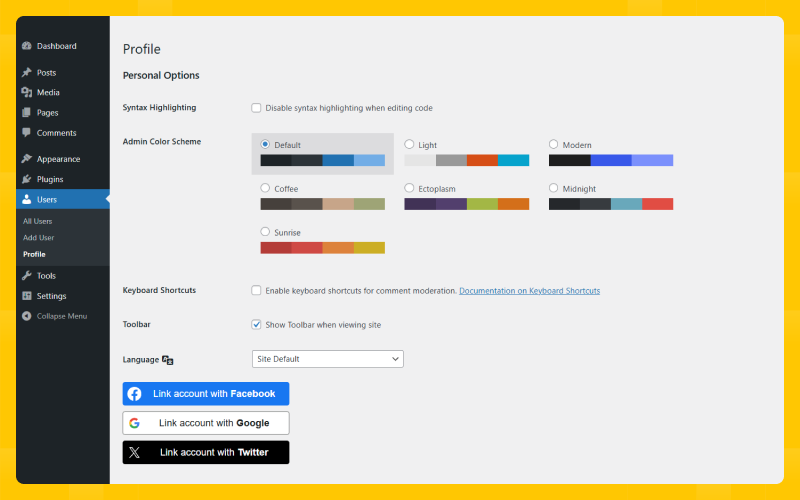
Nextend Social Login and Register in the profile page for account linking 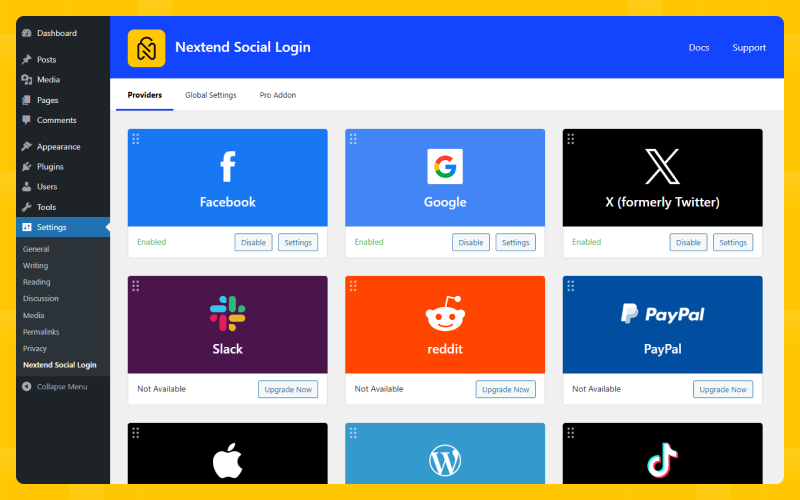
The Providers page with the available providers and their states. 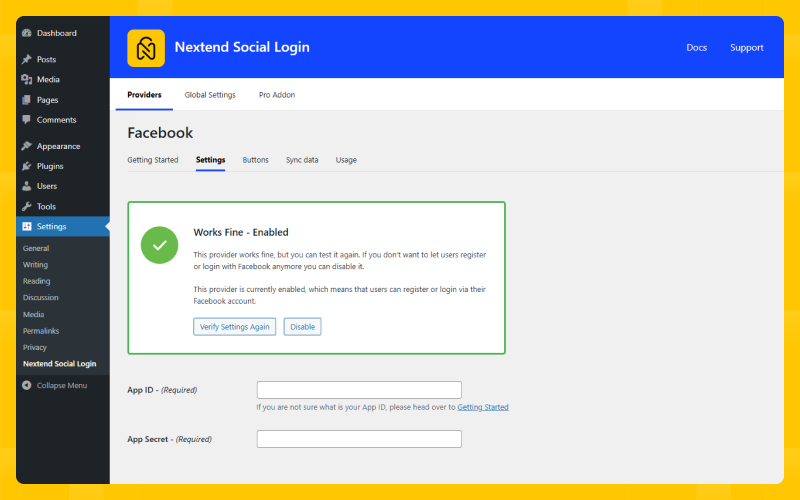
The Settings page of the Facebook provider.
Automatic installation
- Search for Nextend Social Login through ‘Plugins > Add New’ interface.
- Find the plugin box of Nextend Social Login and click on the ‘Install Now’ button.
- Then activate the Nextend Social Login plugin.
- Go to the ‘Settings > Nextend’ Social Connect to see the available providers.
- Configure the provider you would like to use. (You’ll find detailed instructions for each provider.)
- Test the configuration then enable the provider.
Manual installation
- Download Nextend Social Login
- Upload Nextend Social Login through ‘Plugins > Add New > Upload’ interface or upload nextend-facebook-connect folder to the
/wp-content/plugins/directory. - Activate the Nextend Social Login plugin through the ‘Plugins’ menu in WordPress.
- Go to the ‘Settings > Nextend Social Login’ to see the available providers.
- Configure the provider you would like to use. (You’ll find detailed instructions for each provider.)
- Test the configuration then enable the provider.
-
Can I make my site GDPR compliant with Nextend Social Login installed?
-
Sure, Nextend Social Login provides you the tools to make your site GDPR compliant. Check out the Nextend Social Login GDPR documentation to learn more about the topic.
-
1. Where does Nextend Social Login display the social login buttons?
-
The free version of Nextend Social Login displays the social login buttons automatically on the /wp-login.php’s login form and all forms made using the wp_login_form action.
You can use Nextend Social Login’s widget and shortcodes if you need to display the buttons anywhere. If you need to publish the login buttons in your theme, you can use the PHP code. -
After you set up your APP go to the Settings tab and enter the URL of your Terms of Service and Privacy Policy page. Then hit the Update your settings button. Then go to the Permissions tab and check the “Request email addresses from users” under “Additional Permissions”. There’s a documentation that explains the process.
-
3. Why are random usernames generated?
-
When a user tries to register with a social account, Nextend Social Login will try to generate a username from the name that comes from the provider. If this name contains special characters, then we won’t be able to generate a username that is valid for WordPress, as WordPress doesn’t allow special characters in usernames either.
For this reason we will need to generate a unique and random username for the registered account.In the Pro Addon it’s possible to ask an username if we can not generate a valid username, so you can avoid random usernames.
-
4. What should I do when I experience any problems?
-
Contact us via email and explain the issue you have.
-
5. How can I translate the plugin?
-
Find the
.potfile at the /languages folder. From that you can start the translation process. Drop us the final.poand.mofiles and we’ll put them to the next releases. -
6. I have a feature request…
-
That’s awesome! Contact us and let’s discuss the details.
-
7. Does Nextend Social Login work with BuddyPress?
-
Nextend Social Login Free version does not have BuddyPress specific settings and the login buttons will not appear there. However your users will still be able login and register at the normal WordPress login page. Then when logged in they can use every BuddyPress feature their current user role have access to.
Using the Pro Addon you can set where the login buttons should appear on the Register form and how they should look like.
Has a ton of integrations with social platforms and works great.
The Best Team Support, Fast and straight to the point.
Very easy to setup and use, problem is that I have changed my login url, so my fallback url is not working 🙁
Solid plugin, responsive and competent support, all excellent so far.
Simple and easy interface. Works great as it should even at free level. Very instructive and informative – easy to follow.
“Nextend Social Login and Register” is open source software. The following people have contributed to this plugin.
Contributors3.1.25
- Fix: load_plugin_textdomain() will be called on the init action instead of plugins_loaded, as suggested by the WordPress documentation
- Improvement: Pro Addon updater improvements.
3.1.23
- Improvement: Increased the minimum required PHP version to 7.4.
- Improvement: To prevent redundancy and outdated in-plugin guides, the Getting Started instructions within the plugin now link directly to the relevant provider documentation, which can be updated more frequently.
- Improvement: Added Hindi translation.
- Improvement: Introduced the nsl_register_flow_page filter, allowing developers to override the page ID selected in the Page for register flow setting.
- Fix: Shortcode headings are no longer rendered when no buttons are displayed.
3.1.22
- Improvement: Security improvement.
- Improvement: Facebook Getting Started updated.
3.1.21
- Improvement: Pro Addon update – security improvement.
- Fix: WPML compatibility – we might caused WPML to use the selected language in the backend instead of the default language.
3.1.20
- Improvement: Shortcode security improvement.
- Fix: Fixed an issue where the “heading” shortcode parameter was not working in case of the link/unlink buttons.
- PRO: Improvement: VKontakte Endpoints and App creation/configuration process updated to match new requirements.
3.1.19
- Improvement: Google Button skins updated to match design guidelines.
- Improvement: Updated plugin branding color and icon.
- Fix: Fixed an issue where our callback would run multiple times if third parties dispatched DOMContentLoaded events.
3.1.18
- Improvement: Google Getting Started updated.
- Improvement: Facebook Getting Started updated.
- Fix: Fixed an issue where a null value was returned over the “authenticate” and “wp_authenticate_user” filters.
- Fix: Updated domain for the Twitter/X v2 API.
-
Improvement: The email address can now be retrieved from the Twitter/X v2 API as well.
-
PRO: Fix: Fixed an issue where the “default_password_nag” was updated even if the user manually set the password (Ask password on registration).
- PRO: Improvement: Fixed a security vulnerability regarding the Apple provider.
- PRO: Improvement: Added the ability to render the link/unlink buttons using the Custom Actions integration.
- PRO: Improvement: TikTok Getting Started updated.
3.1.17
3.1.16
3.1.15
3.1.14
- Fix: Updated compatibility with Jetpack (Jetpack_SSO class has been changed to Automattic\Jetpack\Connection\SSO).
- Fix: Fixed an issue where the old avatar would still show up due to browser cache even after the avatar has been changed and synced.
- Fix: Fixed an issue where we had forcefully overriden default avatars as well over the “pre_get_avatar_data” filter. Now the “force_default” argument is respected.
- Fix: Fixed an issue where the target window setting couldn’t work properly for buttons that were loaded dynamically after page load.
- Fix: Fixed an issue where the “Fallback username prefix on register” and “Ask Username on registration – When username is empty or invalid” options wouldn’t work if the “Username prefix on register” was set.
- Fix: Fixed an issue where it was possible to have too long of a username, thus not being able to register with the social login.
- Fix: Fixed an issue where consecutive social icons of the same provider could not appear on the same page, when at least one instance was hidden by a CSS visibility property.
- Improvement: Developers from now on can use the “nsl_register_roles” filter to override the default roles of the user registered by social login.
- Improvement: Solid Security 2FA compatibility – Their 2FA solution will only show the 2FA modal if our “Support login restrictions” option is enabled.
-
Improvement: Facebook Getting Started updated.
-
PRO: Fix: Fixed an issue where it was possible to login with the social login through BuddyPress for the first time even if the account was still awaiting activation.
- PRO: Improvement: New TikTok Sync data field: Username ( requires user.info.profile scope ).
- PRO: Improvement: New LinkedIn Sync data fields: Headline, Vanity name ( requires Advertising API ).
- PRO: Improvement: PayPal Getting Started Update.
- PRO: New provider: Patreon
3.1.13
- Improvement: Error message sanitization.
3.1.12
- Fix: We will now delete the user avatar if the social media account which was used to set the avatar for the user gets unlinked.
- Fix: Fixed an issue where an error was thrown whenever the download_url() function would return a WP_Error object during the unlinking process.
- Fix: Fixed an issue where a plugin/theme force update check could cause a fatal error.
- Feature: Global Settings Added new “Unsupported WebView behaviour” option which determines what should happen to the social login buttons in WebView environments.
- Improvement: Removed custom download_url() method, instead we will use the standard WordPress version, as it now works as expected.
- Improvement: Google Getting Started updated.
-
Improvement: Facebook API call version updated from v13.0 to v19.0.
-
PRO: Fix: Updated our code to comply with the fact that func_get_args() no longer reports the original value passed to a parameter, and instead returns the current value.
- PRO: Improvement: Removed no longer needed “Checkout for WooCommerce” integration, and instead added the following actions at the billing form: woocommerce_before_checkout_shipping_form, woocommerce_after_checkout_shipping_form
- PRO: New provider: Spotify
3.1.11
- Fix: The default “Terms and conditions” text can now be translated with our language files.
- Improvement: Facebook Getting Started Update
-
Improvement: Shortcode – customlabel shortcode parameter added, which can be used for specifying a custom label for the connect state of the social buttons rendered by the currently used shortcode. Also you can use the {{providerName}} placeholder to display the name of the given provider in your custom text.
-
PRO: Improvement: Register form – Password template HTML has been updated according to the latest WordPress default Forget Password form structure.
- PRO: Improvement: Custom Actions – Full Site Editing compatibility: the Custom Actions feature now attempts to render the buttons on any actions which are fired after the “init” action. ( Earlier, we tried only on the actions fired after the “login_head” and “wp_head” actions, so the buttons weren’t rendered on the actions that were called within the Block Theme widgets. )
- PRO: Improvement: PayPal Getting Started Update
- PRO: Improvement: PayPal integration updated according to the new PayPal endpoint and API changes.
- PRO: New provider: Reddit
3.1.10
3.1.9
3.1.8
- Fix: In some cases we opened the login popup window in an incorrect position.
- Fix: Some language files had wrong language codes in their names. For example es_LA had been renamed to es_ES and zh_ZH to zh_CN.
- Improvement: Facebook Getting Started Update
- Improvement: The HTML of the “Register” submit button in our Register flow can now be overridden over template files.
- Improvement: Registration – if the provider has account select screen, then the user will be able to select another account if an error prevented the registration.
- Improvement: Auto-linking security improvements.
- Improvement: Google provider – new OAuth2 authorization and token endpoints.
- Improvement: Developers can now use the “nsl_required_capability” filter to override the default capability ( manage_options ) that is required to be able to access the backend of Nextend Social Login.
- Improvement: Japanese translation added.
- Improvement: Hebrew translation added.
-
Feature: Twitter – option to choose whether we should use v1.1 or the v2.0 OAuth flow and credentials. ( The different versions have different App creation guides depending on the selected value. )
-
PRO: Fix: Yahoo provider – The redirect URL suggestion will now contain the complete Yahoo endpoint URL, as new Apps now require an exact match ( earlier the URLs with query strings weren’t accepted ).
- PRO: Improvement: Developers can now add extra validation logics for the “Ask E-mail/Password/Username on registration” features by using the “nsl_validate_extra_input_password_errors”, “nsl_validate_extra_input_username_errors” and “nsl_validate_extra_input_username_errors” filters.
- PRO: Improvement: The HTML of the “Ask E-mail/Password/Username on registration” features can now be overridden over template files.
- PRO: Feature: Line provider – added an option to allow the auto login.
- PRO: Feature: BuddyPress registration integration – so BuddyPress can send its registration notifications upon registration with social login, too.
- PRO: Feature: Discord provider – v10 API support
- PRO: Feature: Discord provider – Sync data fields added.
3.1.7
- Fix: The !important CSS rules can cause problems for AMP validators, so we will use more specific selectors instead.
- Fix: Some object cache might caused a PHP warning when the login happened with third party login forms.
- Fix: There was a JavaScript error in WordPress-like login forms that didn’t fire any login specific actions
- Improvement: Twitter Getting Started Update
- Improvement: Support login restrictions – BuddyPress activation integration – in this case the actual registration is done by BuddyPress, not Nextend Social Login.
- Improvement: Developers can now define the NSL_DISABLE_IN_AMP_REQUESTS constant, to disable the social buttons and its assets in the AMP requests.
- Improvement: Developers can now use the “nsl_disabled_register_redirect_url” and “nsl_disabled_login_redirect_url” filters to override the redirects in most cases when the registration or login with social login fails for some reason
- Improvement: Introduced some public PHP functions that developers can use to get some user data outside of our normal flow
- Improvement: Avatar storing improvements
-
Feature: Option to allow the profile syncing separately for the registration, login and link actions
-
PRO: Fix: Apple provider – There was an encoding problem with the scope parameter of the Apple authorization URL.
- PRO: Improvement: Developers can now override the GitHub and Disqus client credentials over the “nsl_disqus_api_key” / “nsl_disqus_api_secret” and “nsl_github_client_id” / “nsl_github_client_secret” filters. ( Can be useful for multi sites and multi language sites, as the App of these providers support only a single redirect URL. )
- PRO: Improvement: Microsoft Getting Started Update
- PRO: New provider: Twitch
3.1.6
- Fix: Google provider – Google OAuth no longer supports any kind of WebViews, so the Google button will be hidden in all WebView environments.
- Fix: User selected language in the backend didn’t load our translations in certain cases.
- Improvement: We will trigger the “wp_login_failed” action when the login with social login fails, so the login history plugins could track the failed login attempts happened with social login, too.
-
Improvement: The unlinked social media identifier will be now available from the “nsl_unlink_user” action parameters.
-
PRO: Fix: Microsoft provider – ErrorInsufficientPermissionsInAccessToken error when using the Personal Audience option.
- PRO: Fix: Steam provider – Error when pressing the “Got it” button on the “Fix OAuth Redirect URIs” page while the Steam provider was enabled.
- PRO: Fix: TikTok provider – Invalid request parameters error
- PRO: Improvement: TikTok provider – Getting Started Update
- PRO: Feature: TikTok provider – button skin selector added.
3.1.5
- Fix: The Jetpack Boost plugin stopped our authentication flow
- Fix: The “WP 2FA” plugin could prevent the login with social login even if our “Support login restrictions” feature was disabled
- Fix: PHP error when other plugins tried to force WordPress to update the plugin update transients ( update_plugins ) with null parameter
- Fix: The “Page Transitions” feature of Elementor Pro opened our links in the opener window, causing a redirect in both the popup and the popup opener window
- Improvement: Introducing the “nsl_connect_button_custom_attributes”, “nsl_unlink_button_custom_attributes”, “nsl_link_button_custom_attributes” filters to add extra attributes on our button links
- Improvement: Avatar storing – We won’t try to copy the avatar into our avatar folder if the same file is already there
- Improvement: Avatar storing – If the earlier stored avatar file doesn’t exist, we will delete the associated attachment data the next time the user logs in
-
Improvement: Facebook provider – Graph API version of the used endpoints have been updated from v7.0 to v13.0
-
PRO: Fix: There was a JavaScript error on the WordPress default Lost Password page when separator layouts were used
- PRO: Fix: We didn’t display the intended warning when the Free version was not compatible with the Pro Addon.
- PRO: Fix: Apple provider – PHP warning when verifying the provider settings for the first time
- PRO: Fix: WebView – we will no longer display the separator either, if we can not display any social buttons because of the embedded browser environment.
- PRO: Fix: TikTok provider – the registration and login didn’t work as TikTok modified their endpoints, the request method and the response of their API.
- PRO: Improvement: Yahoo provider – Getting Started Update
- PRO: Improvement: PayPal provider – Getting Started Update
- PRO: Feature: BuddyPress – option to show/hide the Social Accounts tab
- PRO: Feature: BuddyPress – Introducing “nsl_bp_social_accounts_tab_slug” filter to modify the slug of the BuddyPress – Social Accounts tab.
- PRO: Feature: Line – Initial Login method and Force initial login method settings.
- PRO: New provider: Steam
3.1.4
3.1.3
3.1.2
-
Improvement: If there is a slow server or a poor internet connection, the redirect after the authentication with social login might take some time. During this time we will display a loading spinner, so the visitor will know that something is about to happen.
-
PRO: New provider: Discord
- PRO: Fix: The Microsoft provider used a wrong redirect url, when the Frontend and the Backend URL of the site were different.
- PRO: Improvement: New options for the Line provider: Force reauthorization on each login and Add LINE Official Account as a friend
- PRO: Improvement: New options for the Microsoft provider: Audience and Authorization Prompt
- PRO: Feature: Integration for Easy Digital Downloads Checkout form.
- PRO: Feature: Display social buttons with layouts on Custom Actions
3.1.1
-
Improvement: string paths from the language files have been removed.
-
PRO: Improvement: VKontakte provider – we will use the API version 5.131 for the endpoints, as API version 5.74 is deprecated.
- PRO: Feature: Easy Digital Downloads login and register form support.
3.1.0
3.0.29
- Fix: We added clear: both; on .nsl-container to make floated elements before the buttons not to mess up the layout.
- Fix: Jetpack removed the “Register” button in our register flow when the registration was handled over the WordPress default login page.
- Improvement: The social buttons with the Default style will try to go as wide as the longest button, if there is enough space in the social button container element.
- Feature: Fullwidth style for the social buttons.
- Summer Sale offer
3.0.28
- Fix: We didn’t display the disabled registration notification when the “OAuth redirect uri proxy page” feature was used.
- Fix: Google provider – Social button didn’t appear in Opera Mini and iOS Opera Touch.
- Fix: WordPress couldn’t download the avatars coming from the social media when the avatar URL was too long.
- Fix: Our styles were missing from pages with AMP mode of “AMP for WP”.
- Fix: There was an AMP validation error as earlier we didn’t load our styles into the unique style tag with the “amp-custom” attribute.
- Fix: Database – There was a database error on MySQL 8.0.17 and above, as the display width attribute has been deprecated for integer data types.
- Fix: Database – Default values of register_date, login_date and link_date have been changed from “0000-00-00 00:00:00” to NULL, since the old value could cause a database error when we tried to make database structure modifications in databases when NO_ZERO_DATE, NO_ZERO_IN_DATE values are set in sql_mode.
- Improvement: Developers can now pass false value for the nsl_disabled_register_error_message filter for turning off our registration disabled notification.
- Improvement: Google provider – The Google button will no longer be hidden in Line App WebView, as Google allows the authentication over the WebView of this App.
- Improvement: Developers can now use the nsl_unlink_user action to run custom function when a user unlinks the social media account from the WordPress account.
- Improvement: Twitter Getting Started Update
- Improvement: Google Getting Started Update
- Improvement: Facebook Getting Started Update
- Improvement: The context “Register form submit button label” has been added to the Register button appearing in our register flow. So it can now be translated with language files separately.
-
Improvement: On the frontend we will use native JavaScript instead of jQuery.
-
PRO: Fix: Linkedin provider didn’t store the first name and last name, if the account didn’t have profile with English as either primary language or secondary language.
- PRO: Fix: Our integration for “Checkout for WooCommerce” didn’t work with their most recent versions.
- PRO: Improvement: Apple Getting Started Update
3.0.27
- Fix: Ultimate Member prevents our registration when we need to ask extra information before the registration.
- Fix: post_mime_type PHP notice.
- Improvement: Italian translation files added.
- Improvement: Notice handling logic improvements.
- Improvement: Twitter Getting Started Update
- Improvement: Facebook Getting Started Update
- Improvement: Facebook Warning for App replacing
- Improvement: Google provider – using OAuth2 v2 endpoint
- Improvement: 2 new filters for customizing the redirect url and error message when login is disabled.
- Improvement: Database – new column “social_users_id” for Primary Key
- Improvement: PHP 8.0 compatibility
-
Improvement: We will override the WordPress default avatar using the “pre_get_avatar_data” filter instead of “get_avatar” filter.
-
PRO: Fix: Apple provider – Logo overlaps the box shadow of the light button skin
- PRO: Improvement: New Google Sync data fields: Genders and Locations ( requires People API )
- PRO: Removed: Google Sync data fields: Gender, Profile link, Taglines and Residences
3.0.26
3.0.25
3.0.24
- Fix: BuddyPress 6.0 compatibility fix.
3.0.23
3.0.22
-
Fix: Updated language files
-
PRO: Fix: Plugin could not be activated because it triggered a fatal error. – Fix for the problem: Deactivate and delete “Nextend Social Login Pro Addon” plugin with version 3.0.21, then activate the version 3.0.22.